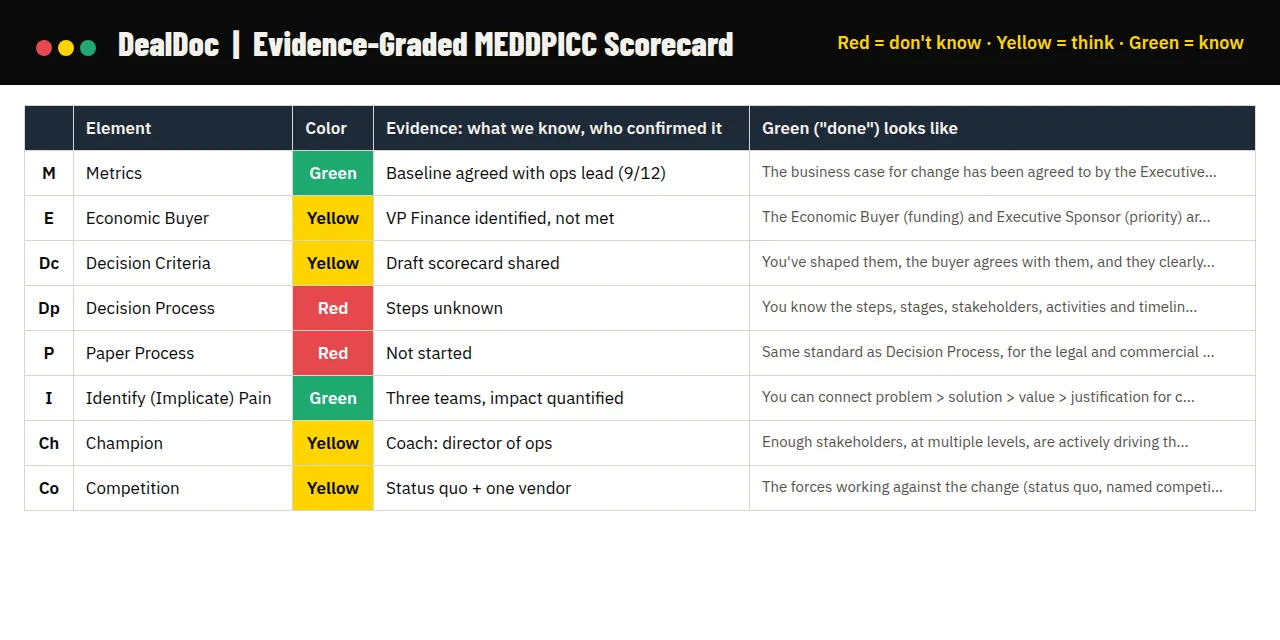
Most MEDDPICC scorecards ask “do we have it?” and accept a name or a number as proof. That’s how you end up with a CRM full of green fields and a forecast that misses.
MEDDPICC isn’t successful because everyone can explain the acronym. It’s successful when sellers know where the gaps are in every deal, and leaders inspect the assumptions. This scorecard is built for that.
What’s in the template
MEDDPICC Scorecard tab. A header for the account, opportunity, stage, forecast category, value and close date. Then one row per element:
- Color (dropdown): red, yellow or green, with the cell filling in automatically. Use N/A for letters your framework doesn’t include.
- Evidence: what we know, who confirmed it, and when.
- Gap: what’s assumed or missing.
- Next action, owner and due date.
- Green (“done”) looks like: the definition of done for that letter, so nobody grades green on a feeling.
A scoreboard counts your greens, yellows and reds, and a commit check tells you whether the deal has earned commit or how many elements still aren’t green.
Color Rubric tab. What red, yellow and green look like for each letter, plus which Deal Management criterion it maps to.
Stage Targets tab. What should be green by each stage, so you don’t panic about a red that’s normal for where the deal is.
Six Criteria Version tab. The same scorecard using the six Deal Management criteria, if that’s what your team runs.
What “done” means for each letter
| Element | Green looks like |
|---|---|
| Metrics | The business case for change has been agreed to by the Executive Sponsor and Economic Buyer. |
| Economic Buyer | The Economic Buyer (funding) and Executive Sponsor (priority) are willing to use their influence to secure both for your initiative. |
| Decision Criteria | You’ve shaped them, the buyer agrees with them, and they clearly favor your solution. |
| Decision Process | You know the steps, stages, stakeholders, activities and timelines, you’re tracking them, and they’re moving in the agreed direction. |
| Paper Process | The same standard as Decision Process, for the legal and commercial path: steps, stakeholders, activities and timelines known, tracked, and moving in the agreed direction. |
| Identify (Implicate) Pain | You can connect problem > solution > value > justification for change > downstream business impact. |
| Champion | Enough stakeholders, at multiple levels, are actively driving the change and spending political capital to make it happen. |
| Competition | The forces working against the change (status quo, named competitors, build vs. buy, resources and priority) are identified and neutralized. |
How to use it
As a seller, run it before every call, after every call, and before every internal deal conversation:
- Look at the stage you’re in.
- Look at what should be yellow or green by that stage.
- Assess where you actually are.
- If there’s a gap, you have risk. Pick one action that closes it and schedule it.
As a leader, look at the same sheet the seller is looking at. Your job isn’t to hunt for gotchas:
- Pressure-test green. What did we see, hear and validate that makes this green? Who confirmed it, and when? What would make it yellow again?
- Don’t criticize red. Ask for the plan to move it to yellow, and by when.
- Choose one or two actions that move the deal the most, and follow up next week.
Use it in 1:1s, deal reviews and QBRs. The point is that seller and manager are looking at the same thing and having the same conversation.
Why colors, not checkboxes
Most CRMs let you click “Pain Identified” or type a number into the Metrics field, and in most systems those numbers come up green. In Deal Management, you’re red, yellow at best, until the buyer agrees on the baseline, agrees on how much you can improve it, and the business case built on it has been challenged and signed off by the people who fund and prioritize the project.
Three colors map to three honest states: we don’t know, we think, we know. And every yellow comes with an obvious next step: go validate it.
To run the meeting around this scorecard, see How to Run a MEDDPICC Deal Review. For the one-page rubric, grab the Color Coding Cheat Sheet.